
How to Create Professional Invoices Online (Free Invoice Generator Guide)
Running a business, freelancing, or selling products online requires one important document for every transaction: an invoice.
A professional invoice helps businesses maintain proper records, track payments, comply with tax regulations, and build trust with customers.
Instead of creating invoices manually using spreadsheets or word processors, many businesses now use an invoice generator to create invoices within seconds.
In this guide, you’ll learn how to create professional invoices online, understand GST invoice requirements, avoid common invoicing mistakes, and use our free Invoice Generator to simplify billing.
What Is an Invoice Generator?
An invoice generator is an online tool that helps create professional invoices quickly and accurately.
Instead of manually designing invoices, users simply enter:
- Business details
- Customer information
- Products or services
- Quantity
- Price
- GST or tax information
The tool automatically generates a professional invoice ready for download or printing.
Businesses use invoice generators to save time, reduce errors, and maintain consistent documentation.
Why Professional Invoices Matter
Invoices are more than payment requests.
They serve as:
- Legal transaction records
- Tax documentation
- Business accounting records
- Payment tracking documents
- Customer reference documents
Proper invoices help businesses stay organized and compliant.
Who Should Use an Invoice Generator?
Small Businesses
Local shops, service providers, agencies, and consultants can create invoices quickly.
Freelancers
Designers, developers, marketers, writers, and creators can send professional invoices to clients.
Ecommerce Sellers
Online sellers can generate invoices for customers and maintain accurate records.
GST Registered Businesses
Businesses registered under GST can generate tax-compliant invoices.
Contractors and Service Providers
Electricians, plumbers, event companies, consultants, and technicians can bill customers efficiently.
Information Required for an Invoice
Before creating an invoice, keep the following details ready.
Business Information
- Business Name
- Address
- GSTIN (if applicable)
- Contact Details
Customer Information
- Customer Name
- Billing Address
- Phone Number
- Email Address
Invoice Details
- Invoice Number
- Invoice Date
- Due Date
Products or Services
- Item Name
- Quantity
- Unit Price
- Tax Rate
How to Create an Invoice Online
Step 1: Open the Invoice Generator
Use our free Invoice Generator: Invoice Generator PRO
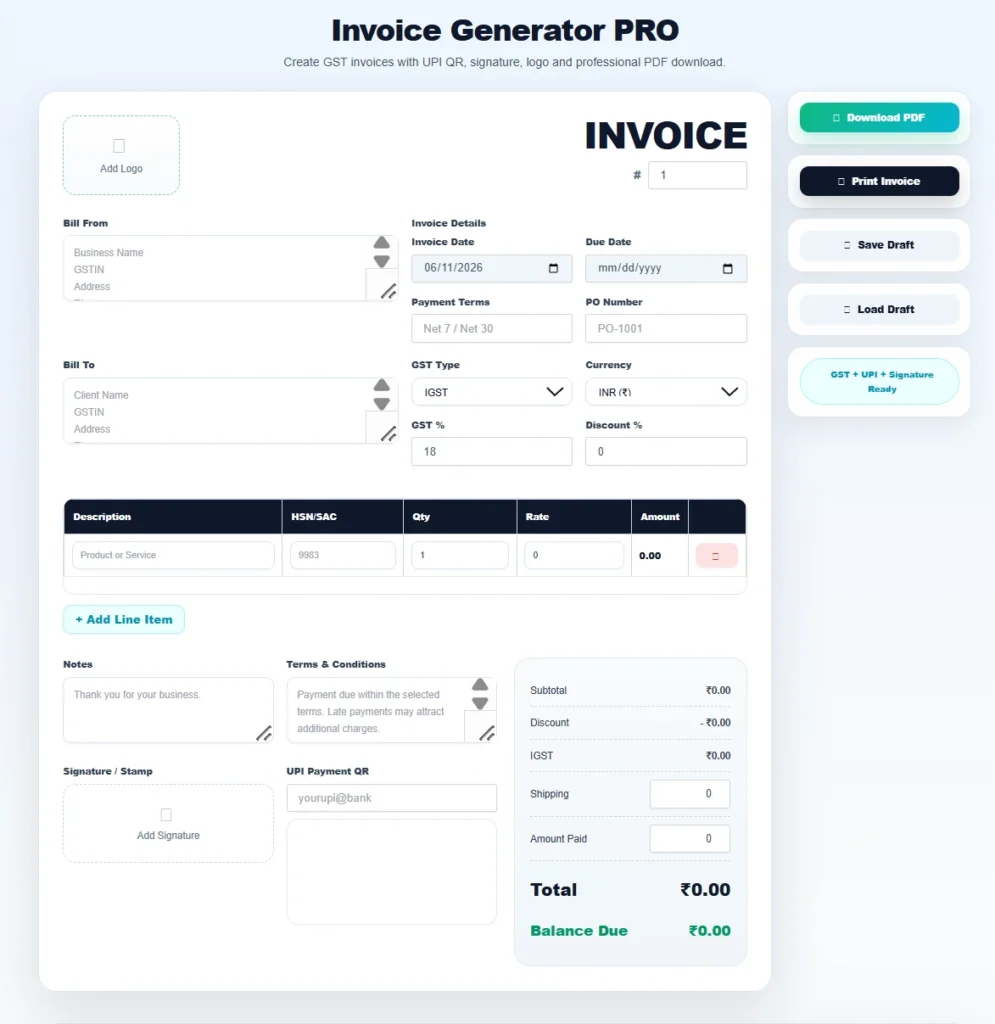
Step 2: Enter Business Details
Add:
- Company Name
- Address
- GST Number
- Contact Information
Step 3: Add Customer Information
Enter the customer or client details accurately.
Step 4: Add Products or Services
List every product or service included in the transaction.
Include:
- Quantity
- Price
- Tax Information
Step 5: Generate Invoice
The Invoice Generator automatically calculates totals and prepares a professional invoice.
Step 6: Download and Share
Download the invoice as PDF and send it to customers.
Benefits of Using an Online Invoice Generator
Saves Time
Create invoices within minutes.
Professional Appearance
Improve customer trust with clean invoice designs.
Reduces Errors
Automatic calculations minimize mistakes.
Better Record Keeping
Maintain organized transaction history.
GST Compliance
Generate invoices that include required GST information.
GST Invoice Requirements in India
If your business is GST registered, invoices should include:
- Business Name
- GSTIN
- Invoice Number
- Invoice Date
- Customer Details
- Product Description
- HSN/SAC Code (where applicable)
- GST Breakdown
- Total Invoice Amount
Always verify current requirements using official GST resources.
Common Invoice Mistakes to Avoid
Missing Invoice Number
Every invoice should have a unique number.
Incorrect Customer Information
Verify names and addresses before sending.
Tax Calculation Errors
Incorrect GST calculations can create compliance issues.
Missing Due Dates
Always specify payment deadlines.
Unclear Product Descriptions
Customers should clearly understand billed items.
Invoice Generator vs Manual Invoicing
Manual Invoicing
- Time consuming
- Higher chance of errors
- Difficult formatting
Invoice Generator
- Fast
- Accurate
- Professional
- Easy to download
- Better record management
Best Practices for Business Invoicing
Before sending invoices:
✔ Verify customer details
✔ Verify tax calculations
✔ Use sequential invoice numbers
✔ Include payment terms
✔ Keep invoice copies
✔ Download PDF versions
Official Resources
GST Portal
Ministry of Corporate Affairs
Startup India
https://www.startupindia.gov.in
Always verify legal and tax requirements from official government resources.
Related Tools
Frequently Asked Questions
Is the Invoice Generator free?
Yes. You can generate professional invoices online without paying.
Can I create GST invoices?
Yes. The tool supports GST invoice creation.
Can freelancers use this tool?
Absolutely. Freelancers can create invoices for clients and projects.
Can I download invoices as PDF?
Yes. Generated invoices can be downloaded and shared.
Is invoice numbering important?
Yes. Unique invoice numbers help maintain proper business records.
Can small businesses use an invoice generator?
Yes. Small businesses benefit greatly from faster invoice creation and better record management.
Final Thoughts
A professional invoice is one of the most important business documents. Whether you’re a freelancer, ecommerce seller, consultant, startup, or GST-registered company, using an Invoice Generator can save time, reduce errors, and improve professionalism.
Instead of manually creating invoices, use a dedicated invoice generator to create clean, accurate, and tax-compliant invoices within minutes.