
Multi Language Typing Tool: Type in Kannada, Hindi, Tamil, Telugu & More Online
If you want to type in Kannada, Hindi, Tamil, Telugu, Malayalam, Sanskrit, or other Indian languages but do not have a regional keyboard installed, a multi language typing tool can make the process much easier.
Many users need to type in regional languages for social media posts, government forms, school projects, YouTube descriptions, WhatsApp messages, business communication, religious content, blogs, and daily writing.
Instead of installing a separate keyboard for every language, you can type using English letters and convert the text into your selected language instantly.
In this guide, you’ll learn how a multi language typing tool works, when to use it, its benefits, common mistakes to avoid, and how to use our free Multi Language Typing Tool online.
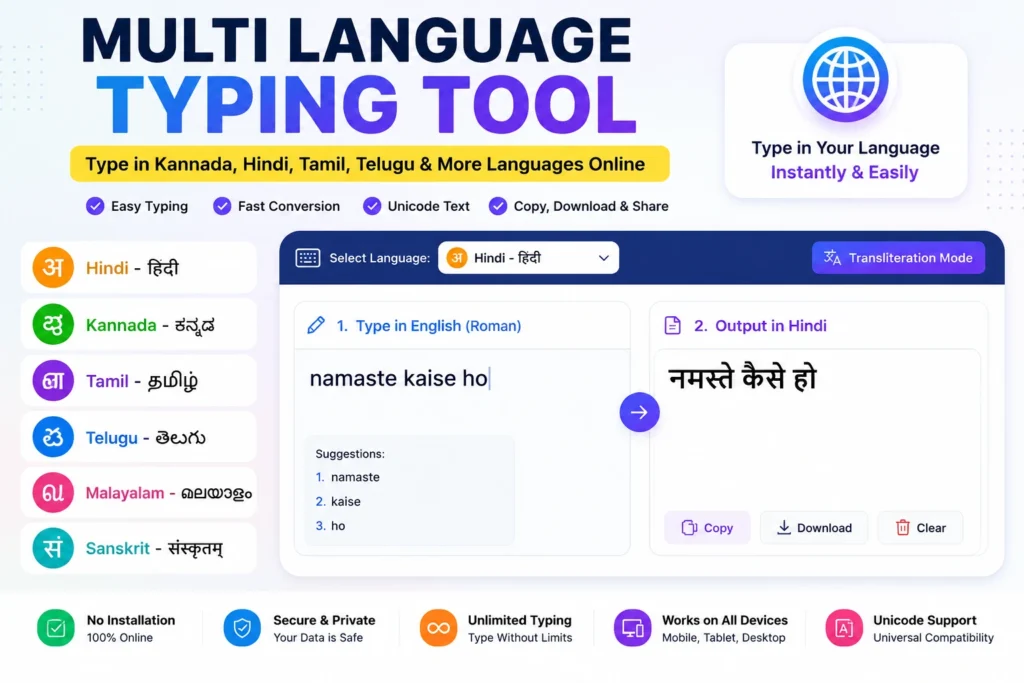
What Is a Multi Language Typing Tool?
A multi language typing tool is an online typing tool that helps you type in different languages using English letters.
For example, if you type:
“namaste”
the tool can help convert it into Hindi, Kannada, Telugu, Tamil, or another selected language depending on the language option you choose.
This process is commonly known as transliteration.
It is different from translation.
Translation changes the meaning from one language to another.
Transliteration changes the script while keeping the pronunciation similar.
That means you can type words in English spelling and get regional language output in Unicode text.
Why Use a Multi Language Typing Tool?
Typing in Indian languages can be difficult if you do not know the keyboard layout.
Many people are comfortable typing English letters but want output in their native language.
A multi language typing tool solves this problem.
It is useful because:
- No keyboard installation is required
- No special font download is needed
- Works directly in your browser
- Helps create Unicode text
- Supports copy, print, download, and share
- Useful for mobile and desktop users
Whether you are typing a short WhatsApp message or a long article, this tool can save time.
How Multi Language Typing Works
Online multilingual typing usually works through transliteration.
You type words using Roman English spelling.
The tool suggests matching words in the selected language.
You can then choose the correct word option and continue typing.
For example:
- “namaskara” can become Kannada text
- “vanakkam” can become Tamil text
- “namaste” can become Hindi text
- “mee peru” can become Telugu text
This makes regional typing simple even for users who do not know native keyboard layouts.
Supported Language Typing Use Cases
A multi language typing tool can be used for many Indian languages and regional typing needs.
Common use cases include:
- Hindi typing
- Kannada typing
- Tamil typing
- Telugu typing
- Malayalam typing
- Sanskrit typing
- Regional language writing
- Unicode text creation
- Social media captions
- Government application text
- Local business communication
This makes the tool useful for students, creators, teachers, business owners, and everyday users.
English to Kannada Typing Online
Kannada typing is widely used for:
- Social media posts
- Local business messages
- Kannada YouTube titles
- Kannada devotional content
- School and college assignments
- Kannada blogs
- Government-related forms
If you do not have a Kannada keyboard, you can type Kannada words using English spelling and convert them into Kannada script.
This is useful for people who can speak Kannada but are not comfortable typing directly on a Kannada keyboard.
English to Hindi Typing Online
Hindi typing is one of the most common uses of multilingual typing tools.
Many users need Hindi text for:
- WhatsApp messages
- YouTube descriptions
- Instagram captions
- Hindi articles
- Government forms
- Devotional content
- Educational notes
Using a multi language typing tool, you can type Hindi using familiar English spelling and get Hindi Unicode text instantly.
English to Tamil Typing Online
Tamil typing is useful for personal, educational, religious, and business communication.
People use Tamil typing tools for:
- Tamil captions
- Tamil messages
- Tamil YouTube content
- Tamil blog posts
- Tamil devotional writing
- Local business notices
A typing tool makes it easy to create Tamil text without switching keyboard layouts.
English to Telugu Typing Online
Telugu typing is useful for Telugu-speaking users who want to create Telugu text quickly.
Common uses include:
- Telugu social media posts
- Telugu YouTube scripts
- Telugu captions
- Telugu devotional content
- Local communication
- Educational notes
Instead of learning a Telugu keyboard layout, users can type Telugu words using English pronunciation.
Benefits of Unicode Text
A good multi language typing tool creates Unicode text.
Unicode text works properly across:
- Websites
- Mobile phones
- YouTube
- WordPress
- Google Docs
- Government portals
This is important because old font-based typing may not display correctly on all devices.
Unicode text is safer, cleaner, and more compatible.
How to Use the Multi Language Typing Tool
Step 1: Open the Tool
Use our free tool:
Multi Language Typing Tool
https://themultitools.com/multi-language-typing-tool/
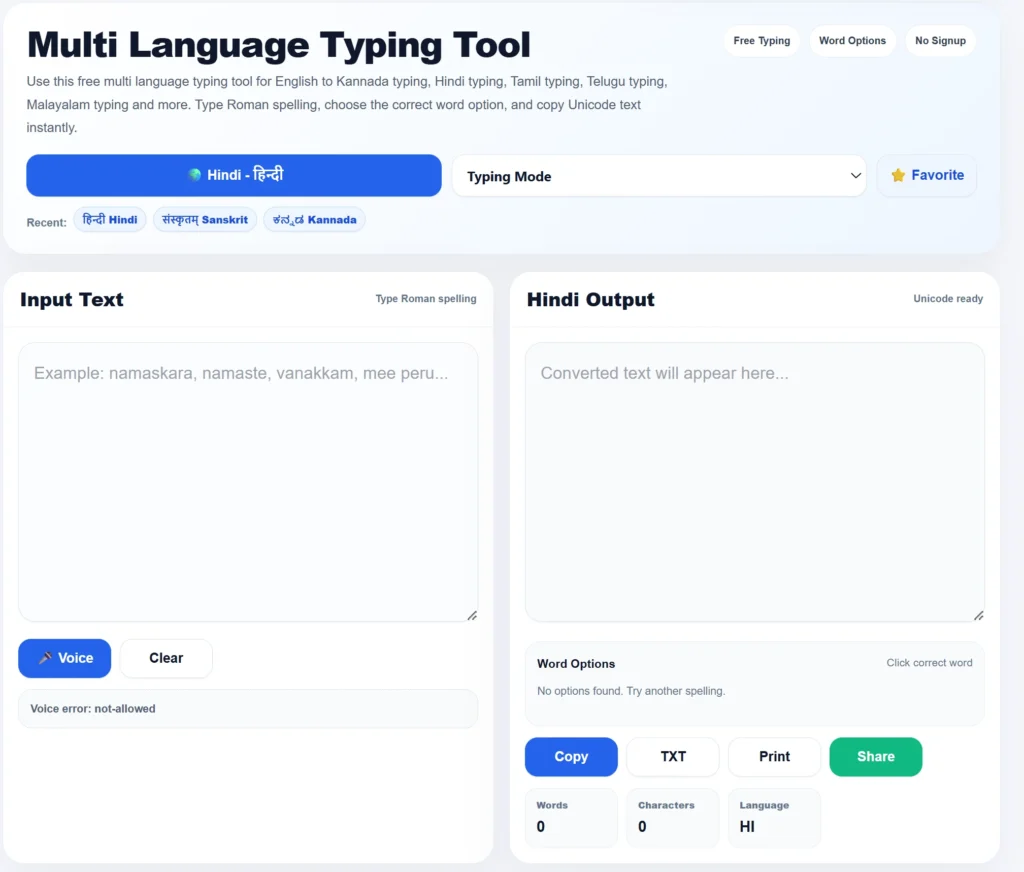
Step 2: Select Your Language
Choose the language you want to type in.
For example:
- Hindi
- Kannada
- Tamil
- Telugu
- Malayalam
- Sanskrit
Step 3: Type Using English Letters
Enter your words using Roman English spelling.
Example:
“namaste”
or
“namaskara”
or
“vanakkam”
The tool will generate language-based word options.
Step 4: Choose the Correct Word
Select the correct word from the suggestions if multiple options appear.
This helps improve accuracy.
Step 5: Copy, Download, Print, or Share
Once your text is ready, you can:
- Copy the text
- Download as TXT
- Share
This makes it useful for both personal and professional writing.
Common Uses of Multi Language Typing Tool
Social Media Posts
You can create posts in your native language for:
- X / Twitter
- YouTube Community Posts
- WhatsApp Status
Regional language posts often connect better with local audiences.
YouTube Titles and Descriptions
Creators can use regional language typing for:
- Video titles
- Descriptions
- Tags
- Community posts
- Shorts captions
This is useful for creators targeting Kannada, Tamil, Telugu, Hindi, or Malayalam audiences.
Government Forms and Applications
Some forms may require names, addresses, or local language details.
A multi language typing tool can help prepare Unicode text before copying it into the required form.
Always verify the final text carefully before submission.
Business Communication
Local businesses can use regional language text for:
- Offers
- Customer messages
- Flyers
- Posters
- Product descriptions
- WhatsApp broadcasts
Writing in the customer’s language can improve trust and response.
Education and Assignments
Students and teachers can use multilingual typing for:
- Notes
- Assignments
- Worksheets
- Presentations
- Language learning
- School projects
This is especially helpful when regional language typing is required but the keyboard is not available.
Multi Language Typing Tool vs Keyboard Installation
Installing a regional keyboard can be useful for advanced users.
But many people do not want to switch keyboard layouts.
Here is the difference:
| Feature | Online Typing Tool | Regional Keyboard |
|---|---|---|
| Setup | No installation | Requires setup |
| Ease of Use | Simple | Needs practice |
| Device Support | Browser-based | Device-specific |
| Best For | Quick typing | Regular advanced typing |
| Copy Support | Easy | Manual |
For most users, an online typing tool is faster and simpler.
Common Mistakes to Avoid
Using Wrong English Spelling
Transliteration depends on pronunciation.
If the spelling is unclear, the output may not be accurate.
Not Checking Word Suggestions
Some words may have multiple options.
Always select the correct word when suggestions appear.
Mixing Languages Too Much
If you mix too many languages in one sentence, output may become confusing.
Copying Without Proofreading
Always proofread before posting or submitting.
This is especially important for names, addresses, and official content.
Expecting Translation
A multi language typing tool does not translate meaning.
It helps you type pronunciation-based text in another script.
Why Use TheMultiTools Multi Language Typing Tool?
Our Multi Language Typing Tool is designed to be simple, fast, and beginner-friendly.
You can use it for:
- Hindi typing
- Kannada typing
- Tamil typing
- Telugu typing
- Malayalam typing
- Sanskrit typing
- Unicode text output
- Copy and download
- Print and share
It works directly in your browser and is useful for daily writing, content creation, education, business, and personal communication.
Official Language and Typing Resources
You can learn more about language input, Unicode, and digital language support from these official resources:
Google Input Tools Help
https://support.google.com/inputtools
Digital India
https://www.digitalindia.gov.in
These resources help explain digital language input, Unicode support, and India’s digital language ecosystem.
Start Typing in Multiple Languages Instantly
Need to type in Hindi, Kannada, Tamil, Telugu, Malayalam, Sanskrit or other Indian languages? Use our free Multi Language Typing Tool to convert English typing into Unicode text instantly. No installation, no signup, and completely free to use.
Try Multi Language Typing Tool →Related Tools
Frequently Asked Questions
What is a multi language typing tool?
A multi language typing tool helps you type in different languages using English letters and converts them into regional language script.
Can I type Kannada online?
Yes. You can type Kannada online using English spelling and convert it into Kannada Unicode text.
Can I type Hindi without installing a keyboard?
Yes. You can type Hindi online using English letters without installing a Hindi keyboard.
Does this tool support Tamil typing?
Yes. You can use it for Tamil typing and other Indian language typing needs.
Can I type Telugu using English letters?
Yes. You can type Telugu words using English pronunciation and convert them into Telugu text.
Is the Multi Language Typing Tool free?
Yes. The tool is free to use online.
Can I use this tool on mobile?
Yes. It works on mobile, tablet, laptop, and desktop browsers.
Can I copy the typed text?
Yes. You can copy the output text and use it in documents, messages, social media, or websites.
Is this tool a translator?
No. It is mainly a typing and transliteration tool. It helps convert typed pronunciation into regional script.
Can I use it for government forms?
Yes, you can prepare regional language Unicode text, but always verify spelling before submitting official forms.
Need a Fast Online Hindi, Kannada or Tamil Typing Tool?
Convert English typing into Hindi, Kannada, Tamil, Telugu, Malayalam and many other Indian languages instantly. Perfect for government forms, social media posts, blogs, school projects, business documents and everyday communication.
Start Typing Now →Final Thoughts
A multi language typing tool is one of the easiest ways to type in Indian languages without installing multiple keyboards.
Whether you want to type in Hindi, Kannada, Tamil, Telugu, Malayalam, Sanskrit, or another language, online transliteration can save time and make regional language writing easier.
It is useful for social media, government forms, education, business communication, YouTube content, WhatsApp messages, and daily writing.
Use our free Multi Language Typing Tool whenever you need fast, simple, and browser-based regional language typing.