
Smart QR Code Generator: Create QR Codes for Links, WiFi, Contact Cards & Payments
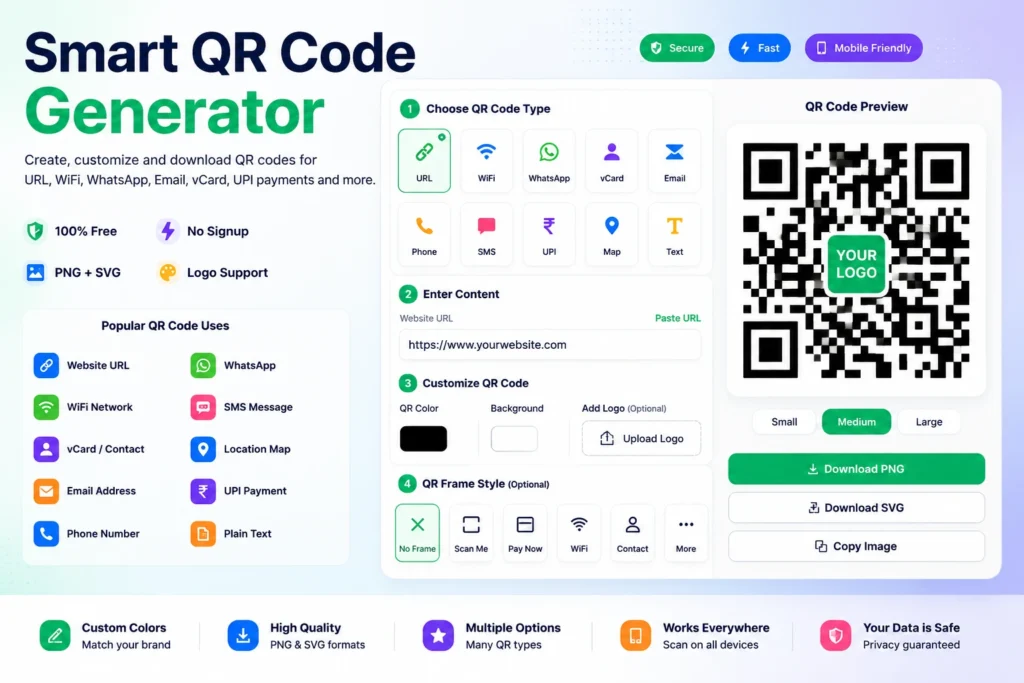
If you want to share a website link, WiFi password, contact details, payment information, location, email, phone number, or business profile quickly, a smart qr code generator can make the process simple.
Instead of asking people to type long links or manually save details, you can create a QR code that users can scan instantly from their mobile phone.
QR codes are now used by businesses, restaurants, freelancers, schools, event organizers, shops, marketers, ecommerce sellers, and creators because they make information sharing faster and easier.
In this guide, you’ll learn what a smart QR code generator is, how QR codes work, where they are used, common mistakes to avoid, and how to create professional QR codes online using our free Smart QR Code Generator.
What Is a Smart QR Code Generator?
A smart QR code generator is an online tool that helps you create QR codes for different types of information.
You can create QR codes for:
- Website links
- WiFi networks
- Contact cards
- Phone numbers
- Email addresses
- SMS messages
- Locations
- Payment details
- Business profiles
When someone scans the QR code using a mobile phone camera or QR scanner, the stored information opens instantly.
This makes QR codes useful for both online and offline communication.
Why Use a Smart QR Code Generator?
A smart QR code generator saves time and reduces manual typing.
For example, instead of printing a long website URL on a poster, you can print a QR code.
Users can scan it and open the page instantly.
This is useful because:
- No typing is required
- Works on mobile phones
- Easy to print
- Useful for business cards
- Helpful for menus and brochures
- Works for payments and contact sharing
- Great for marketing campaigns
QR codes help connect offline materials with online actions.
How QR Codes Work
A QR code stores information in a scannable square pattern.
When a user scans the code, their device reads the data and performs an action.
For example:
- A URL QR code opens a website
- A WiFi QR code connects to a network
- A vCard QR code saves contact details
- A phone QR code opens the dialer
- An email QR code opens an email draft
- A location QR code opens a map
This makes QR codes very flexible for everyday and business use.
Common Types of QR Codes
A smart QR code generator can create different types of QR codes based on your need.
Website URL QR Code
A website QR code opens a link when scanned.
You can use it for:
- Business websites
- Landing pages
- Product pages
- Blog posts
- Portfolio links
- Online stores
- Event registration pages
This is one of the most common QR code types.
WiFi QR Code
A WiFi QR code lets users connect to a WiFi network without typing the password manually.
This is useful for:
- Cafes
- Restaurants
- Offices
- Hotels
- Events
- Guest rooms
- Home visitors
Users simply scan the code and connect faster.
vCard Contact QR Code
A vCard QR code stores contact details.
It can include:
- Name
- Phone number
- Company name
- Website
- Address
This is useful for business cards, networking events, freelancers, consultants, and professionals.
You can also use our vCard Generator to create digital contact details easily.
Phone Number QR Code
A phone QR code opens the phone dialer with your number ready to call.
This is useful for:
- Shops
- Service businesses
- Clinics
- Local listings
- Flyers
- Customer support
- Sales teams
It reduces friction for customers who want to contact you quickly.
Email QR Code
An email QR code opens an email draft.
It can include:
- Email address
- Subject
- Message body
This is useful for support requests, feedback forms, inquiry campaigns, and business communication.
SMS QR Code
An SMS QR code opens a text message with a pre-filled number and message.
This is helpful for:
- Customer support
- Event confirmation
- Feedback collection
- Quick responses
- Service requests
Location QR Code
A location QR code opens a map location.
This is useful for:
- Shops
- Offices
- Restaurants
- Event venues
- Clinics
- Real estate visits
- Local businesses
Instead of typing an address, users can scan and navigate directly.
Payment QR Code
Payment QR codes are widely used for fast digital payments.
Businesses can use payment QR codes for:
- Shops
- Freelancers
- Restaurants
- Small businesses
- Delivery orders
- Events
- Service providers
Always verify payment details before printing or sharing payment QR codes.
How to Create a QR Code Online
Step 1: Open the Tool
Use our free tool:
Smart QR Code Generator
https://themultitools.com/smart-qr-code-generator/
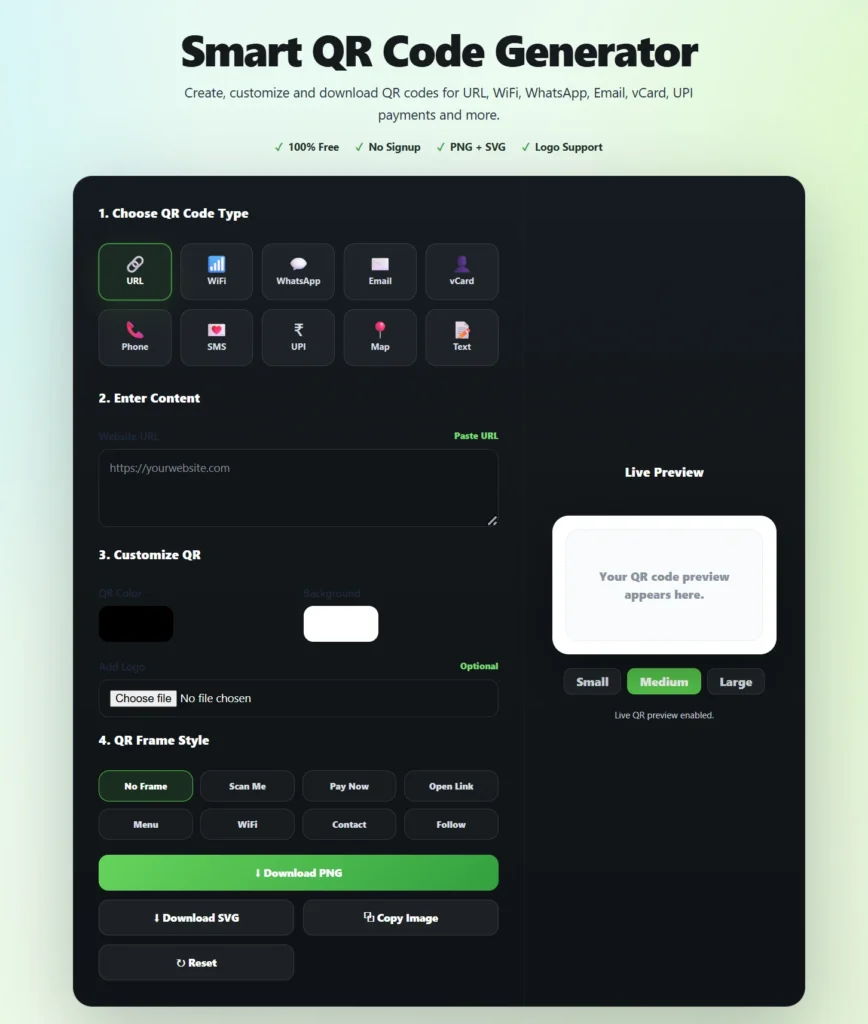
Step 2: Choose QR Code Type
Select what you want to create.
For example:
- URL QR code
- WiFi QR code
- vCard QR code
- Email QR code
- Phone QR code
- Location QR code
- Payment QR code
Choosing the correct type helps the QR code work properly.
Step 3: Enter Your Details
Add the required information.
For a website QR code, enter the URL.
For WiFi, enter the network name and password.
For contact cards, enter name, phone, email, company, and website.
Step 4: Generate the QR Code
Click the generate button.
The tool will instantly create a scannable QR code.
Step 5: Test Before Sharing
Always test the QR code before printing or publishing.
Scan it with your mobile phone and verify that it opens the correct information.
Step 6: Download and Use
Download the QR code and use it on:
- Posters
- Flyers
- Menus
- Business cards
- Product packaging
- Websites
- Presentations
- Social media graphics
QR Codes for Businesses
Businesses can use QR codes to reduce friction and improve customer experience.
Common uses include:
- Website visits
- Product pages
- Contact sharing
- Feedback forms
- Payment collection
- Google review pages
- WhatsApp chat links
- Digital catalogs
A smart QR code generator helps businesses create these codes quickly without design or coding skills.
QR Codes for Restaurants
Restaurants commonly use QR codes for:
- Digital menus
- Table ordering
- Payment links
- Feedback forms
- Google review links
- WiFi access
QR codes make the customer experience smoother because users can scan and access information instantly.
QR Codes for Freelancers and Professionals
Freelancers can use QR codes on:
- Business cards
- Portfolios
- Invoices
- Proposals
- Brochures
- Social media profiles
A vCard QR code is especially useful because clients can save contact details quickly.
QR Codes for Events
Event organizers can use QR codes for:
- Registration links
- Ticket verification
- Venue location
- Feedback forms
- Speaker profiles
- Event schedules
QR codes help attendees access event information without confusion.
QR Codes for Ecommerce Sellers
Ecommerce sellers can use QR codes for:
- Product manuals
- Warranty registration
- Customer support
- WhatsApp support
- Feedback collection
- Repeat purchase links
- Social media pages
This helps improve post-purchase communication and customer trust.
Common QR Code Mistakes to Avoid
Not Testing the QR Code
Always scan the QR code before printing.
A small mistake in the URL or payment details can create problems.
Using Low Contrast
QR codes should have strong contrast.
Dark code on a light background usually scans better.
Making the QR Code Too Small
If the QR code is too small, mobile phones may struggle to scan it.
Use a readable size for print materials.
Placing QR Codes on Busy Backgrounds
Avoid placing QR codes over complex images or patterns.
Clean backgrounds improve scan accuracy.
Not Adding a Clear Label
Tell users what the QR code does.
Example:
- Scan to open menu
- Scan to save contact
- Scan to pay
- Scan to visit website
This improves scan rates.
Best Practices for QR Code Design
Before sharing a QR code:
- Use high contrast
- Keep enough white space around the code
- Test on multiple phones
- Use a clear call-to-action
- Avoid stretching the image
- Print in good quality
- Place it where users can scan easily
A QR code is only useful if people can scan it quickly.
Why Use TheMultiTools Smart QR Code Generator?
Our Smart QR Code Generator is designed to be simple, fast, and practical.
You can create QR codes for:
- Website links
- WiFi networks
- Contact cards
- Emails
- Phone numbers
- SMS messages
- Locations
- Payments
- Business use
It works directly in your browser and does not require complicated setup.
Whether you are a business owner, student, freelancer, marketer, restaurant owner, ecommerce seller, or event organizer, this tool helps you create useful QR codes quickly.
Official QR Code Resources
You can learn more about QR code standards and usage from these official resources:
ISO QR Code Standard
https://www.iso.org/standard/62021.html
GS1 QR Code Standards
https://www.gs1.org/standards/gs1-qr-codes
Google Developers QR Code Documentation
https://developers.google.com/chart/infographics/docs/qr_codes
These resources explain QR code standards, structured data usage, and technical implementation details.
Try Our Smart QR Code Generator
Stop Sharing Long Links — Create a QR Code Instead
Make it easier for customers, clients, students, guests, and visitors to access your information instantly with a simple QR code scan.
Create QR codes for websites, WiFi networks, contact cards, payments, business profiles, events, menus, and more.
⚡ Generate Free QR Code NowRelated Tools
Frequently Asked Questions
What is a smart QR code generator?
A smart QR code generator is an online tool that creates QR codes for websites, WiFi, contact cards, phone numbers, emails, locations, payments, and more.
Can I create a QR code for a website link?
Yes. You can enter any website URL and generate a QR code that opens the link when scanned.
Can I create a WiFi QR code?
Yes. A WiFi QR code can help users connect to your network without typing the password manually.
Can I create a QR code for contact details?
Yes. You can create vCard QR codes that help users save contact details quickly.
Can I create payment QR codes?
Yes. QR codes can be used for payment-related information, but always verify details carefully before sharing.
Are QR codes free to create?
Yes. You can create QR codes online using a free QR code generator.
Do QR codes expire?
Static QR codes usually do not expire unless the linked content or destination is removed.
Can QR codes be printed?
Yes. QR codes can be printed on posters, flyers, menus, business cards, labels, and packaging.
Can QR codes be scanned on mobile phones?
Yes. Most modern smartphones can scan QR codes using the camera app.
What size should a QR code be?
It depends on where you use it. For print, make sure it is large enough to scan easily and has enough white space around it.
Final Thoughts
A smart qr code generator is a simple but powerful tool for sharing information faster.
From website links and WiFi passwords to contact cards, payments, locations, emails, and business profiles, QR codes make it easier for people to access information instantly.
Whether you are running a business, managing a restaurant, organizing an event, creating marketing materials, or sharing personal contact details, QR codes can save time and improve user experience.
Use our free Smart QR Code Generator whenever you need a fast, clean, and scannable QR code online.
Create Professional QR Codes in Seconds
Generate QR codes for website URLs, WiFi passwords, WhatsApp chats, contact cards, email addresses, phone numbers, SMS messages, locations, UPI payments and more.
Customize colors, add your logo, choose QR styles, and download high-quality PNG or SVG files instantly — completely free.
🚀 Open Smart QR Code Generator