
AI Subtitle Generator: Create Automatic Video Captions & Subtitles Online
If you create videos for YouTube, Instagram Reels, TikTok, Facebook, podcasts, online courses, webinars, or business presentations, subtitles are no longer optional.
Modern viewers consume content differently.
Many users watch videos with the sound turned off. Others depend on subtitles for accessibility, language support, and better understanding.
Adding subtitles manually can be one of the most time-consuming parts of video editing.
That’s why an AI Subtitle Generator has become an essential tool for creators, businesses, educators, and marketers.
Instead of typing captions manually, AI can automatically detect speech, convert audio into text, synchronize timing, and generate professional subtitles within minutes.
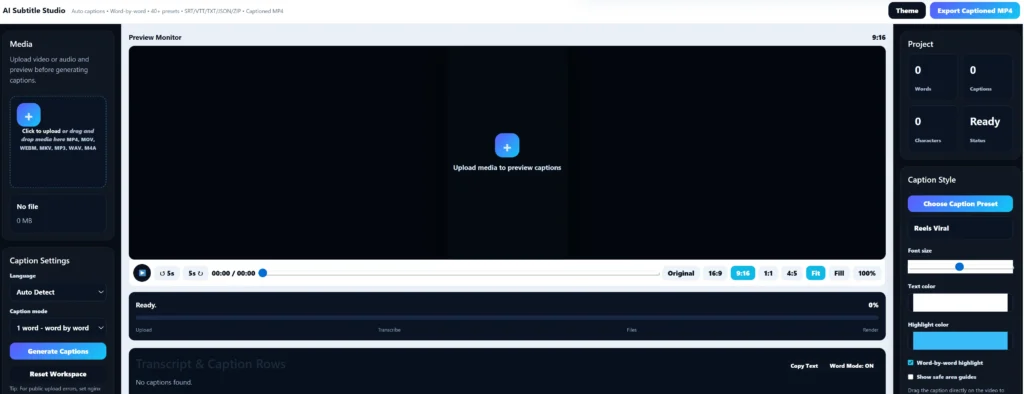
In this guide, you’ll learn how AI subtitle generation works, why captions matter, the different subtitle formats available, and how to use our AI Subtitle Generator Caption Studio to create engaging video captions quickly.
What Is an AI Subtitle Generator?
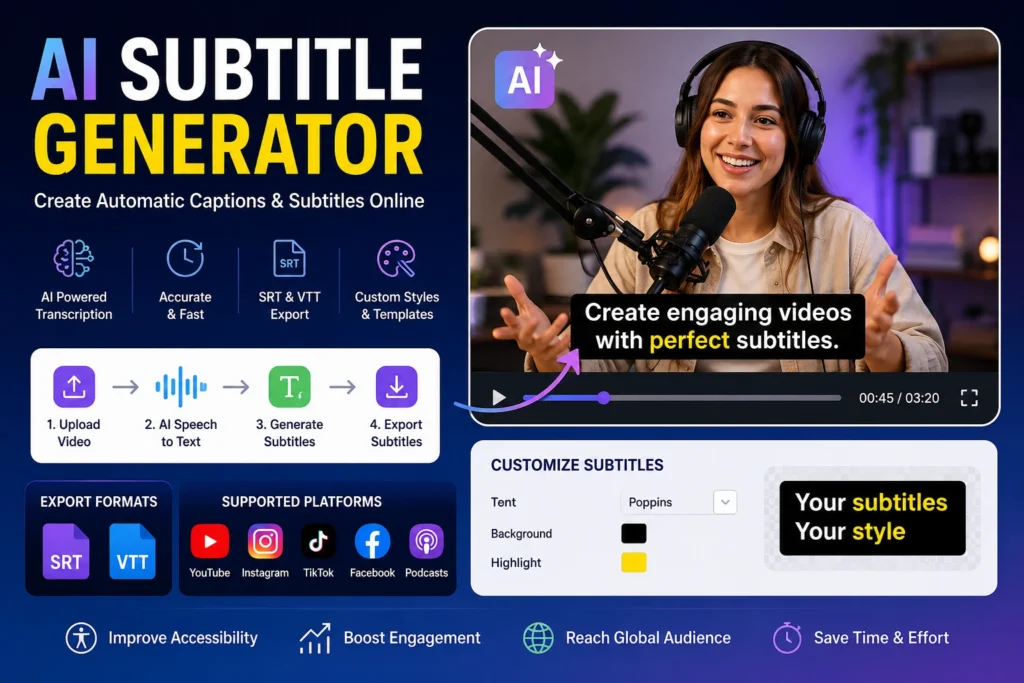
An AI Subtitle Generator is a tool that automatically converts spoken audio into subtitles.
The tool listens to speech inside a video, transcribes the spoken words, and creates timed captions that appear on screen.
Instead of manually typing every sentence and synchronizing timestamps, artificial intelligence performs most of the work automatically.
Modern subtitle generators can:
- Detect spoken words
- Convert speech into text
- Generate subtitle timestamps
- Export subtitle files
- Create burned-in captions
- Support multiple languages
- Improve accessibility
This significantly reduces editing time for content creators.
Why Video Captions Matter
Subtitles do much more than display words on screen.
They help improve engagement, accessibility, and viewer retention.
Many viewers scroll through social media with their phones muted.
Without captions, they may skip your video immediately.
With captions:
- More people understand your content
- Videos become easier to follow
- Engagement often improves
- Watch time can increase
- Accessibility improves
Subtitles help videos perform better across multiple platforms.
Benefits of Automatic Subtitle Generation
Saves Hours of Editing
Manual subtitle creation can take longer than editing the video itself.
AI automation helps generate captions much faster.
Improves Accessibility
Captions make content accessible to viewers who are deaf or hard of hearing.
This helps more people consume your content comfortably.
Increases Viewer Retention
Many viewers stay longer when subtitles are available.
Captions help viewers follow along even in noisy environments.
Supports Multiple Languages
Some subtitle tools support translation and multilingual workflows.
This can help creators reach larger audiences.
Better Social Media Performance
Short-form platforms such as Instagram Reels, TikTok, and YouTube Shorts often benefit from dynamic captions.
Captions help users understand content instantly.
How AI Subtitle Generation Works
AI subtitle tools typically use speech recognition technology.
The process usually works like this:
Step 1: Upload Video
The creator uploads a video file.
Step 2: Audio Analysis
The AI analyzes speech inside the video.
Step 3: Speech Recognition
Spoken words are converted into text.
Step 4: Timestamp Synchronization
Each subtitle receives accurate timing information.
Step 5: Subtitle Generation
The tool creates subtitle files or burned-in captions.
Step 6: Export
Users can export subtitles in different formats.
This process often takes only a few minutes compared to manual captioning.
Subtitle Formats Explained
Different subtitle formats are used depending on where the video will be published.
The most common formats include:
- SRT
- VTT
- Burned-In Captions
- Closed Captions
Understanding these formats helps creators choose the correct option.
SRT Subtitle Files
SRT (SubRip Subtitle) is one of the most common subtitle formats.
An SRT file contains:
- Subtitle text
- Start time
- End time
Benefits:
- Simple format
- Widely supported
- Easy to edit
- Compatible with YouTube
Many creators use SRT files because they are lightweight and easy to upload.
VTT Subtitle Files
VTT stands for Web Video Text Tracks.
It is commonly used for web-based video platforms.
Advantages include:
- Additional styling support
- Better web compatibility
- HTML5 video support
Many modern websites and online learning platforms use VTT subtitles.
Burned-In Captions vs Subtitle Files
There are two common ways to use subtitles.
Burned-In Captions
These captions become part of the video permanently.
Advantages:
- Always visible
- Works on every platform
- Popular for social media
Disadvantages:
- Cannot be turned off
- Requires re-exporting for edits
Subtitle Files
Separate subtitle files remain independent from the video.
Advantages:
- Easy to edit
- Can be enabled or disabled
- Supports multiple languages
Disadvantages:
- Requires subtitle support from the platform
Both methods have their place depending on your publishing goals.
AI Subtitle Generator for YouTube
YouTube creators use subtitles to improve accessibility and engagement.
Subtitles can help:
- Increase watch time
- Improve viewer understanding
- Reach international audiences
- Support SEO through transcript indexing
Creators often upload SRT files alongside videos for better control over captions.
AI Subtitle Generator for Instagram Reels
Instagram users often watch videos without sound.
Captions help viewers understand content immediately.
Benefits include:
- Higher engagement
- Better retention
- Easier storytelling
- Improved accessibility
Dynamic caption styles are especially popular on Instagram.
AI Subtitle Generator for TikTok Videos
TikTok videos rely heavily on fast communication.
Captions help creators:
- Deliver messages quickly
- Improve watch completion rates
- Make videos easier to understand
Short-form video creators frequently use word-by-word subtitle effects.
AI Subtitle Generator for Podcasts
Podcast creators increasingly publish video versions of their content.
Subtitles help:
- Improve accessibility
- Increase content consumption
- Make clips easier to share
- Repurpose podcast content for social media
Captions also make podcast highlights more engaging.
AI Subtitle Generator for Online Courses
Educational videos benefit significantly from subtitles.
Students can:
- Follow lessons more easily
- Review concepts faster
- Learn in noisy environments
- Understand technical terms better
Subtitles improve learning experiences across devices.
How to Generate Subtitles Automatically
Generating subtitles usually follows a simple workflow.
Step 1
Upload your video.
Step 2
Choose subtitle language.
Step 3
Start AI transcription.
Step 4
Review generated captions.
Step 5
Edit mistakes if necessary.
Step 6
Export subtitles or burn captions into the video.
This workflow allows creators to produce professional subtitles efficiently.
Customizing Subtitle Styles
Creating subtitles is only the first step.
Modern creators use styled captions to make videos more engaging and easier to follow.
Custom subtitle styling can help:
- Improve readability
- Match brand identity
- Increase watch time
- Enhance viewer experience
- Make videos look more professional
A good AI subtitle generator should allow customization options for fonts, colors, backgrounds, animations, and caption layouts.
Font Selection
The font you choose can affect how easily viewers read subtitles.
Popular subtitle fonts include:
- Arial
- Montserrat
- Poppins
- Open Sans
- Roboto
Good subtitle fonts should be:
- Easy to read
- Clear on mobile devices
- Visible against video backgrounds
Avoid overly decorative fonts that may reduce readability.
Text Colors
Subtitle color plays an important role in visibility.
Popular options include:
- White text
- Yellow text
- White text with black outline
- Yellow text with dark shadow
Many creators use white text because it remains readable across different backgrounds.
Adding outlines or shadows can further improve visibility.
Background Styles
Background styling helps subtitles stand out.
Common styles include:
Transparent Background
Clean and professional.
Solid Background
Useful when videos have busy visuals.
Rounded Caption Boxes
Popular on Instagram Reels and TikTok.
Highlighted Keywords
Helps viewers focus on important words.
Good background styling improves readability without distracting from the video.
Word-by-Word Highlight Effects
Many modern creators use animated subtitle styles.
Word-by-word highlighting:
- Improves viewer focus
- Increases engagement
- Makes videos feel dynamic
- Works well for short-form content
This style is especially common on:
- Instagram Reels
- TikTok
- YouTube Shorts
- Podcast clips
Common Subtitle Mistakes to Avoid
Even with AI automation, creators should review subtitles before publishing.
Not Reviewing AI Output
Speech recognition is powerful but not perfect.
Always review captions before exporting.
Using Hard-to-Read Fonts
Fancy fonts may look attractive but reduce readability.
Choose simple, professional fonts.
Poor Subtitle Placement
Avoid placing captions where platform buttons or interface elements may cover them.
Too Many Words Per Line
Keep subtitles short and easy to read.
Large blocks of text can overwhelm viewers.
Low Contrast Colors
Ensure subtitles stand out against the background.
Poor contrast can make captions difficult to read.
Ignoring Mobile Viewers
Most social media content is consumed on mobile devices.
Always preview subtitles on smaller screens.
Why Use TheMultiTools AI Subtitle Generator?
TheMultiTools AI Subtitle Generator is designed to help creators generate subtitles quickly without complicated editing software.
Features include:
- Automatic subtitle generation
- AI speech-to-text conversion
- SRT export
- VTT export
- Burned-in caption support
- Caption style customization
- Multiple subtitle templates
- Fast processing
- Creator-friendly workflow
Whether you’re creating YouTube videos, Reels, TikTok content, podcast clips, webinars, or educational content, the tool helps streamline subtitle creation.
Official Subtitle Resources
You can learn more about subtitles, caption standards, and video accessibility from these official resources:
YouTube Subtitle Guidelines
https://support.google.com/youtube/answer/2734796
W3C WebVTT Standard
Vimeo Caption & Subtitle Help
https://help.vimeo.com/hc/en-us/articles/12426150952593
These resources provide additional guidance for caption formatting, subtitle standards, and accessibility best practices.
Generate Professional Video Captions in Minutes
Upload your video and automatically generate subtitles for YouTube, Instagram Reels, TikTok, podcasts, webinars, online courses and social media content.
Export SRT, VTT and caption files, customize subtitle styles and improve viewer engagement instantly.
🚀 Open AI Subtitle GeneratorFrequently Asked Questions
What is an AI subtitle generator?
An AI subtitle generator automatically converts spoken audio into timed subtitles and captions using speech recognition technology.
Can I generate subtitles automatically?
Yes. AI tools can analyze video audio and generate subtitles without manual typing.
Can I export SRT subtitle files?
Yes. Most subtitle generators support SRT exports for YouTube and video editing workflows.
What is a VTT subtitle file?
VTT is a subtitle format commonly used for HTML5 video players and web platforms.
Can I create subtitles for YouTube videos?
Yes. AI subtitle generators are commonly used to create YouTube captions and subtitle files.
Can I generate captions for Instagram Reels?
Yes. Many creators use AI subtitles to create engaging Reel captions and animated text effects.
Can I add subtitles to TikTok videos?
Yes. AI subtitle tools can generate captions suitable for TikTok content.
Does subtitle generation improve engagement?
Captions often improve accessibility, viewer retention, watch time and content understanding.
Can I customize subtitle fonts and colors?
Yes. Most modern subtitle generators support font, color, background and animation customization.
Are subtitles useful for online courses?
Yes. Subtitles improve learning experiences and make educational content easier to follow.
Related Tools
Final Thoughts
An AI Subtitle Generator can dramatically reduce the time required to create professional captions and subtitles.
Whether you’re a YouTuber, podcaster, educator, marketer, business owner, or social media creator, subtitles help improve accessibility, viewer engagement, and content performance.
Instead of spending hours manually creating captions, AI can automate transcription, timing, formatting, and subtitle export.
Use our AI Subtitle Generator Caption Studio whenever you need fast, accurate, and customizable video captions.
About The Author
Josh is the founder of TheMultiTools and creates practical AI, media, business, ecommerce and productivity tools designed to help creators and professionals work faster and smarter.